
Updated October 27, 2026 | By the Review Riches team
Prices and specifications were checked against manufacturer and retailer listings on October 27, 2026. Prices change often, especially around sales events, so confirm the live price before you buy.
Affiliate disclosure
Review Riches is reader-supported. When you buy through links on this page, we may earn an Amazon commission at no extra cost to you. That is how we keep the site free. It never changes which products we pick: every model below was chosen from manufacturer specifications, retailer listings and published expert roundups, and the flaws of each pick are stated in its review. One pick in this guide — the UPLIFT V3 — is not sold on Amazon, so it has no Amazon link and earns no Amazon commission. It is included because it is the premium benchmark the other desks are measured against, and that is stated in its review.
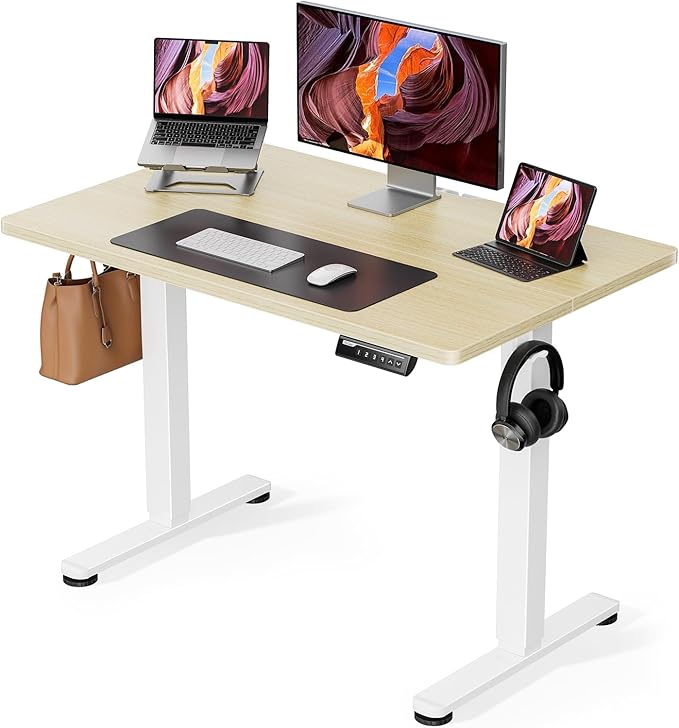
A standing desk that stays steady at full height: a strong frame, a real weight rating, and a height range that fits the person using it.
The short answer
If you sit for most of the working day, buy a real electric standing desk with a dual-motor frame — not the cheapest single-motor frame you can find, and not a converter pretending to be a desk. A good standing desk needs three things a cheap frame cannot give you: a height range that covers both your sitting elbow height and your standing elbow height, a weight capacity at least three times your actual desk load, and a frame that does not wobble when you type at full height.
For most people, the FlexiSpot E7 is the right buy: a 22.8 to 48.4 inch height range, a 355 lb capacity, dual motors, and four memory presets, with a representative 60 by 30 inch bamboo configuration at $579. If you want the best-built desk and the most choice of sizes and finishes, buy the UPLIFT V3 instead — from $599 for a laminate desk direct from UPLIFT, with a 15-year warranty and the sturdiest frame in this guide. If you are tall, or you hate assembling furniture, the Vari Electric is the honest alternative: it goes to 50.5 inches, the highest in this guide, and assembles with eight screws in about 15 minutes. If your budget is around $100, the FEZIBO 48 by 24 and the ErGear EGESD5B are the two honest choices — both electric, both 176 lb capacity, both with a 46.5 inch maximum height that suits most people under 6 ft 2 in, and both with real limits you should know before you buy.
What a standing desk will not do is fix bad ergonomics on its own. It is a tool for changing position through the day — sitting, standing, and moving between the two. Pair it with a good chair from our guide to the best office chairs in the USA, and with a walking pad from our walking pads guide if you want to move while you work. The desk is for standing; the chair is for sitting well; the walking pad is for moving.
Quick picks: all six at a glance
| Model | Best for | Price* | Height range | Capacity | Motor | Warranty |
|---|---|---|---|---|---|---|
| FlexiSpot E7 | Best overall | $499–$699 by config; $579 for 60×30 bamboo | 22.8–48.4 in | 355 lb | Dual | 15-yr frame; 5-yr motor† |
| UPLIFT V3 | Best premium / most customisable | From $599 laminate direct; $699+ bamboo | 22.6–48.7 in | 355 lb | Dual | 15-yr frame, motor, electronics |
| Vari Electric | Tall users / fastest assembly | Check Amazon; $949 direct for 60×30 TechTrack | 25–50.5 in | 200 lb | Dual | Lifetime† |
| FEZIBO 48×24 | Best value | $99.99 on Amazon (list $149.99) | 28.3–46.5 in | 176 lb | Dual | Not verified — see review |
| ErGear EGESD5B 48×24 | Cheapest electric | $100 on Amazon (list $120) | 28.35–46.46 in | 176 lb | Not verified† | Not verified — see review |
| VariDesk Pro Plus 36 | Converter only — not a full desk | ~$395 | 4.5–17.5 in lift | 35 lb | Spring-assisted | 5 yr |
* Prices checked October 27, 2026 on the manufacturer’s US store, Amazon US, or a major US price tracker. Standing-desk prices move a lot around sales events, so treat every price here as a checked price on that date, not a promise. FlexiSpot and UPLIFT prices depend on the desktop size and material you choose — always compare the same configuration.
† FlexiSpot motor warranty: most sources say 5 years on the motor, but at least one roundup lists 15 years on frame and motor together. We use 5 years for the motor here and flag the disagreement in the review. Vari’s warranty is listed as lifetime on Vari’s own site in 2026, up from 5 years — see the Vari review. ErGear’s motor type was not separately verified — see the ErGear review.
How we chose these standing desks
We started from the models US home-office buyers actually buy and that expert testers keep recommending in 2026, then filtered them using manufacturer specification sheets rather than marketing pages. A model had to publish its height range, weight capacity, motor type and warranty before it could be considered.
- Height range first. Your standing elbow height decides the maximum you need; your sitting elbow height decides the minimum. A desk that tops out at 46.5 inches suits most people up to about 6 ft 2 in, but not taller users — and the two budget picks in this guide are both flagged as such.
- Capacity with headroom — multiply your load by three. A dual-monitor setup with two 27-inch displays on arms, a mechanical keyboard, a desktop PC and speakers weighs roughly 85 to 110 lb before you lean on the desk. On a 176 lb budget frame that is more than half the rating, well into wobble territory. On a 355 lb frame the same setup is about a third of capacity.
- Dual motors, not one. Single-motor frames lift unevenly and wobble at standing height when you type. Every full desk in this guide has dual motors, except the ErGear, whose motor count could not be verified from its listings — and that is flagged in its review rather than assumed.
- Stability at full height, not at sitting height. Almost every desk is stable at 28 inches. The test that matters is at 44 to 48 inches, typing hard, with monitors mounted. That is where cheap frames develop play, and where the FlexiSpot E7 and UPLIFT V3 earn their price.
- Assembly you will actually finish. A desk that takes two people and two hours is a desk that sits in a box for a month. Vari’s eight-screw assembly is the benchmark here.
- Warranty is the hidden price difference. The gap between an unverified warranty and a 15-year frame warranty is the single most under-reported difference in this category, and it is called out for every pick.
One honest limit: this is a research-based guide built from manufacturer data, retailer listings and published expert testing, including the standing-desk roundups from WFHWorld, TechRadar, Tom’s Guide and Garage Gym Reviews’ sister testing, plus owner sentiment collected from Reddit roundups. It is not a hands-on lab test, and we do not claim it is one. Where sources disagreed — and they did, on the FlexiSpot E7 and E7 Pro, on the Vari’s capacity, on the ErGear’s presets, and on the FEZIBO’s warranty — we say so in the review instead of picking the friendliest number. Where a Reddit thread page could not be opened on October 27, 2026 — Reddit’s own pages were blocked to our reader — we do not invent quotes from it. The owner-sentiment section below says exactly what could and could not be read.
1. FlexiSpot E7 — Best overall
Price: $499 to $699 depending on desktop size and material, checked October 27, 2026. A representative configuration — 60 by 30 inch bamboo top — costs $579 (frame $429 + desktop $150). Do not compare a $499 frame-only price with a $699 bamboo-desk price; always compare the same configuration.
FlexiSpot E7: a 22.8 to 48.4 inch height range, a 355 lb capacity, and dual motors for about $579 in a popular configuration.
The FlexiSpot E7 is the standing desk we would hand to a home-office buyer who asked for one recommendation and no homework. It is the best-selling electric standing desk in its price class for a reason: a three-stage frame that adjusts from 22.8 to 48.4 inches, a 355 lb capacity, dual motors lifting at 1.5 inches per second at under 50 dB, and four memory presets so two people sharing a desk can each return to their own height with one touch. Anti-collision protection stops the desk if it meets an obstacle, and a cable tray is included on most configurations. At 78 lb for the frame alone it is heavy enough to feel planted.
Two honest warnings, and both matter. First, the FlexiSpot model names are a trap. The E7, the E7 Pro and the E7 Plus are three different desks, and roundups disagree about the E7 Pro’s specs — some list it at the same 355 lb and 22.8 to 48.4 inches as the E7, others at 440 lb and 25.0 to 50.6 inches with a C-frame, and FlexiSpot also sells an “E7 Pro 2026 Edition” with different figures again. This pick is the standard E7, with the specs in the table below. If a listing says “E7 Pro”, check its height range and capacity against the table before you buy. Second, the desktop matters more than buyers expect. The laminate tops scratch more easily than the bamboo or solid-wood options, and the dark bamboo finish has disappointed some owners who expected it to look like real wood.
- Pros: Best stability-to-price ratio in this guide; 355 lb capacity handles dual monitors and a PC without strain; quiet dual motors; four memory presets; 15-year frame warranty; frame accepts desktops from 43 to 79 inches wide, so you can fit your own top.
- Cons: Model names are confusing — E7, E7 Pro and E7 Plus are different desks with different specs; laminate tops scratch; assembly takes 30 to 60 minutes and is easier with two people; some owners report minor wobble if the desk is not levelled perfectly.
- Skip it if: you want the most customisation and the longest motor warranty, or you are over 6 ft 4 in and work at full height every day — buy the UPLIFT V3 instead.
Specifications
| Spec | FlexiSpot E7 |
|---|---|
| Price (checked Oct 27, 2026) | $499–$699 by config; $579 for 60×30 bamboo |
| Height range | 22.8–48.4 in (3-stage frame) |
| Motor | Dual motor, 1.5 in/sec, <50 dB |
| Weight capacity | 355 lb |
| Desktop sizes | 48×24 to 80×30 in; frame fits tops 43–79 in wide |
| Memory presets | 4 |
| Anti-collision | Yes |
| Frame weight | ~78 lb (frame only) |
| Warranty | 15-year frame; 5-year motor (some roundups list 15-year frame and motor — not verified, see review) |
2. UPLIFT V3 — Best premium / most customisable
Price: from $599 for a laminate desk direct from UPLIFT, $699+ for bamboo, checked October 27, 2026. A frame-only V3 costs $498. Prices rise quickly with larger tops, solid-wood finishes and accessories — a fully loaded desk can pass $1,500, so configure the cart, not the sticker price.
UPLIFT V3: the desk the old V2 became, with a stiffer frame, half the assembly hardware, and the same 355 lb capacity.
The UPLIFT V3 is the best-built standing desk in this guide, and the one every other desk is measured against. It is the successor to the UPLIFT V2, which UPLIFT consolidated into the V3 on 25 October 2026: the same 355 lb capacity and 15-year warranty, but a stiffer frame — redesigned dual-wall steel feet, steel plates over the motor housings, and a reworked I-beam crossbar — plus a FlexMount cable manager included as standard and assembly cut to 16 screws. The height range is 22.6 to 48.7 inches, which meets the ANSI/BIFMA ergonomic standard, and the desk is available in four frame colours and roughly 20 desktop finishes, in sizes from 42 to 80 inches wide.
Two honest warnings. First, the V3 gives up height at the top: it tops out at 48.7 inches, about 2.2 inches lower than the old standard V2’s 50.9 inches. If you are over about 6 ft 4 in, add UPLIFT’s foot-raiser or casters, or check your standing elbow height against 48.7 inches before you order. Second, this is the expensive pick, and the price is the price of the configuration: a $599 laminate desk and a $1,500 solid-wood desk are both “the V3”. It is also heavy, especially in larger sizes, and it ships direct from UPLIFT — there is no Amazon listing to fall back on. If you want the V2, stop looking: UPLIFT retired it, and it was removed from upliftdesk.com when the V3 consolidated the range. Existing V2 desks keep their warranty and support, but a new buyer should buy the V3.
- Pros: Best-in-class stability, including at maximum height; 15-year warranty on frame, motors and electronics; simplest assembly in this price range; huge choice of sizes and finishes; FlexMount cable management included; 22.6-inch minimum height suits shorter users.
- Cons: Expensive, and the price rises fast with options; tops out 2.2 inches lower than the old V2; heavy in larger sizes; direct-only — no Amazon purchase, no Amazon commission.
- Skip it if: your budget tops out at $600, or you want to buy on Amazon — buy the FlexiSpot E7 instead.
Specifications
| Spec | UPLIFT V3 |
|---|---|
| Price (checked Oct 27, 2026) | From $599 laminate direct; $699+ bamboo; frame-only $498 |
| Height range | 22.6–48.7 in |
| Motor | Dual motor, <48 dB (manufacturer); independent measurements up to ~54 dB at peak |
| Weight capacity | 355 lb |
| Desktop sizes | 42×30 to 80×30 in; ~20 finishes |
| Memory presets | 4 |
| Anti-collision | Yes |
| Warranty | 15 years (frame, motors, electronics); desktop 5 years |
| Sold via | Direct from upliftdesk.com only — not on Amazon |
3. Vari Electric Standing Desk — Best for tall users / fastest assembly
Price: check the Amazon listing before you buy — no Amazon price was shown in the search results checked on October 27, 2026, and Vari sells direct as well. For reference, Vari’s own site lists a 60 by 30 inch desk with TechTrack at $949, and an open-box 60 by 30 at $510. Do not treat $949 as the Amazon price; it is a different configuration on a different store.
Vari Electric: the tallest desk in this guide, and the fastest to assemble — eight screws, about 15 minutes.
The Vari Electric is the desk for two specific buyers: tall users, and anyone who dreads assembling furniture. Its 25 to 50.5 inch height range is the highest maximum in this guide, and its assembly is the simplest: the desk arrives largely pre-assembled, and the whole thing goes together with eight screws — four to hold the legs to the top, four more for the feet — in about 15 minutes, half the time of most rivals. The current T-style frame is stable and simple, with four programmable memory settings, a 1.25-inch laminate top, and a contoured ComfortEdge front that is easier on forearms during long typing sessions. Vari now backs the desk with a lifetime warranty, up from five years.
The honest limits are the capacity and the missing sensor. At 200 lb, the Vari trails the 355 lb leaders by a wide margin — fine for a laptop and two monitors, not for a tower and three monitors. Some roundups list the ComfortEdge model at 220 lb; Vari’s own specification is 200 lb, and we use Vari’s figure. The current T-style frame also has no anti-collision sensor, and the cable tray costs extra. The old crossbar version, criticised for wobble, is discontinued — if a listing shows it, do not buy it; the ASIN here is for the current T-style ComfortEdge 60 by 30 model, and should be re-checked at publish time.
- Pros: Tallest maximum height in this guide at 50.5 inches; fastest assembly — eight screws, about 15 minutes; lifetime warranty in 2026; stable T-style frame; ComfortEdge front is kind on forearms.
- Cons: 200 lb capacity trails the 355 lb leaders; no anti-collision sensor; cable tray costs extra; more expensive than FlexiSpot for equivalent specs; fewer customisation options than UPLIFT.
- Skip it if: your desk load is heavy — a tower plus three monitors — or you want anti-collision protection — buy the FlexiSpot E7 instead.
Specifications
| Spec | Vari Electric Standing Desk |
|---|---|
| Price (checked Oct 27, 2026) | Amazon price not shown in search results — check the listing; $949 direct for 60×30 with TechTrack |
| Height range | 25–50.5 in |
| Motor | Dual motor |
| Weight capacity | 200 lb (Vari; some roundups list 220 lb for ComfortEdge — not verified) |
| Desktop sizes | 48×30, 60×30, 72×30 in; 1.25 in laminate top |
| Memory presets | 4 |
| Anti-collision | No — not on the current T-style model |
| Warranty | Lifetime (Vari, 2026; was 5 years) |
| Amazon ASIN | B0GF2WW6LT — ComfortEdge 60×30 with TechTrack; re-check at publish that it is the current T-style model, not the discontinued crossbar version |
4. FEZIBO 48x24 Dual Motor — Best value
Price: $99.99 on Amazon US on October 27, 2026 (list price $149.99, 90-day average about $159). Other roundups list the same desk at $109.99 to $112.99 depending on colour — check the colour you want, because the price moves by finish.
FEZIBO 48×24: a real dual-motor electric desk for about $100, with the limits of a $100 desk stated plainly.
The FEZIBO 48 by 24 is the best-value electric standing desk in this guide, and the cheapest way to get a dual-motor frame. For about $100 you get a desk that adjusts from 28.3 to 46.5 inches at about 1 inch per second, under 45 to 50 dB, with three memory presets, anti-collision protection, and a 176 lb capacity on a steel T-frame. The frame is rated by the manufacturer for 50,000 lift cycles, and testers report that it holds steady at standing height for typical loads — a laptop, a monitor and peripherals. Assembly takes about 30 minutes, and most components arrive pre-assembled.
Be clear-eyed about what $100 buys. The desktop comes in two pieces with a visible seam down the middle — FEZIBO sells a one-piece top on other models if a seamless surface matters to you. At 176 lb and 46.5 inches maximum, this is a single-monitor or light dual-monitor desk for people up to about 6 ft 2 in, not a heavy workstation and not a tall person’s desk. The pilot holes for the desktop are small and not always perfectly aligned, so a power screwdriver and a second pair of hands make assembly much easier. There is no child lock on the control panel — the buttons stay live whenever the desk is plugged in, so unplug it if young children can reach it. And the warranty is unverified: one roundup claims a 10-year warranty, but we could not confirm that from FEZIBO’s own listings on October 27, 2026, so we do not state a warranty length as fact.
- Pros: Cheapest dual-motor desk here; stable for typical loads at standing height; quiet at under 45 dB; three memory presets; anti-collision protection included; FSC-certified wood top.
- Cons: Desktop is two pieces with a visible seam; 176 lb capacity and 46.5-inch maximum suit lighter setups and shorter users; pilot holes can be misaligned; no child lock; warranty length could not be verified.
- Skip it if: you are over 6 ft 2 in, you run a heavy dual-monitor-plus-tower setup, or you want a seamless desktop — buy the FlexiSpot E7 instead.
Specifications
| Spec | FEZIBO 48×24 Dual Motor |
|---|---|
| Price (checked Oct 27, 2026) | $99.99 on Amazon (list $149.99) |
| Height range | 28.3–46.5 in |
| Motor | Dual motor, ~1 in/sec, <45 dB |
| Weight capacity | 176 lb |
| Desktop | 48×24 in, two-piece top with visible seam |
| Memory presets | 3 |
| Anti-collision | Yes |
| Warranty | Not verified — one roundup claims 10 years, not confirmed from FEZIBO’s own listings |
| Amazon ASIN | Not verified — use the search link above; one price tracker lists B0DWX2M4Z3 for a Black Walnut variant, but that code was not confirmed as the dual-motor 48×24 listing, so it is NOT used here |
5. ErGear EGESD5B 48x24 — Cheapest electric desk
Price: $100 on Amazon on October 25–26, 2026 ($20 off, list $120, 90-day average $125). The same desk was listed at $99.98 on October 25, 2026 — the price moves by a dollar or two with coupons, so check the live listing.
ErGear EGESD5B: the cheapest electric standing desk we could verify, for about $100 — with two numbers its own listings disagree about.
The ErGear EGESD5B is the cheapest electric standing desk in this guide, and it is a genuine electric desk, not a manual crank or a converter: it adjusts from 28.35 to 46.46 inches, carries 176 lb on a solid steel frame, and is rated by the manufacturer for 100,000 lift cycles. Owners report that it moves smoothly and quietly, feels sturdy for its price, and assembles in about an hour to an hour and a half with clear instructions.
Two numbers in this pick are flagged, not smoothed over. First, the memory presets: DealNews lists three custom height settings for this model, while other listings say four. We do not state a preset count as fact for this desk — check the listing you buy from. Second, the motor count: the pack for this guide could not verify from ErGear’s listings whether the EGESD5B is a dual-motor or single-motor frame, so we do not claim “dual motor” for it. If the listing you buy from does not say dual motor, assume it is not. The top is also thin at a reported 0.67 inches and can flex under heavy loads, and the warranty length could not be verified from ErGear’s listings. And the ASIN trap: B0B41ZBBBY is the ErGear 63 by 28 inch model, not this 48 by 24 desk, and B0CYLWBB74 is a different variant with a bookshelf and monitor stand. Neither is used here. Use the search link and confirm the model number EGESD5B on the listing before you buy.
- Pros: Cheapest electric desk in this guide at about $100; smooth, quiet height adjustment; steel frame feels sturdy for the price; clear assembly instructions; low-VOC materials.
- Cons: Preset count is disputed in listings (3 vs 4); motor count not verified — do not assume dual motor; thin top can flex under heavy loads; two-piece top with a seam; warranty length not verified; 46.46-inch maximum suits people up to about 6 ft 2 in.
- Skip it if: you want a verified dual-motor frame, a seamless top, or a desk for a tall user — buy the FEZIBO if you want a verified dual motor at the same price, or the FlexiSpot E7 if you want a desk that will last a decade.
Specifications
| Spec | ErGear EGESD5B 48×24 |
|---|---|
| Price (checked Oct 25–26, 2026) | $100 on Amazon (list $120; 90-day average $125) |
| Height range | 28.35–46.46 in |
| Motor | Not verified — do not assume dual motor |
| Weight capacity | 176 lb |
| Desktop | 48×24 in, two-piece top; reported 0.67 in thick |
| Memory presets | Disputed in listings: 3 vs 4 — not verified |
| Lift cycles | 100,000 (manufacturer claim) |
| Warranty | Not verified |
| Amazon ASIN | None verified for the plain EGESD5B — do NOT use B0B41ZBBBY (63 in model), B0CYLWBB74 (different variant) or B0C6TQF5LY (storage-pocket model) |
Converter box: VariDesk Pro Plus 36 — only if you already have a desk
Price: about $395 on Amazon, checked October 2026. This is not a full desk, and it is not priced like one — it is a sit-stand riser that sits on top of a desk you already own.
VariDesk Pro Plus 36: a 36-inch spring-assisted riser for dual monitors, with zero assembly — and it is not a standing desk.
The VariDesk Pro Plus 36 is included here only because the old version of this article listed “VARIDESK” as if it were a full standing desk, and that was a mistake. It is a converter: a 36-inch-wide, 52.2 lb platform that sits on your existing desk and lifts your monitors and keyboard from 4.5 to 17.5 inches on a spring-assisted mechanism, through 11 heights, with a 35 lb capacity. It ships fully assembled, it is rock-steady at full height, and it is the best converter in its category for a dual-monitor setup. If you already have a good desk and you only want to stand for part of the day, it is a sensible buy.
- Pros: Best converter in its category; rock-steady screens at full height; zero assembly; 11 heights; 35 lb capacity handles dual monitors.
- Cons: Not a full desk — only 35 lb and a 36-inch platform; heavy at 52.2 lb to move; expensive for what it is if you do not already own a desk; takes up much of your existing desktop.
- Skip it if: you do not already have a desk you like — buy a full electric desk instead.
Specifications
| Spec | VariDesk Pro Plus 36 |
|---|---|
| Price (checked Oct 2026) | ~$395 |
| Lift range | 4.5–17.5 in |
| Weight capacity | 35 lb |
| Width | 36 in |
| Lift type | Spring-assisted, 11 heights |
| Unit weight | 52.2 lb |
| Warranty | 5 yr |
| Amazon ASIN | Not verified — use the search link above |
What owners actually say — and what we could not read
Standing desks are bought on trust in a way treadmills are not: you cannot test-drive a frame’s wobble from a spec sheet. So here is what owners report, and exactly where it came from.
The broad pattern, from a Reddit roundup that aggregates r/StandingDesk sentiment, is consistent across the price bands: UPLIFT is the desk owners recommend when budget allows, praised for stability that does not degrade over time; FlexiSpot’s E7 range is the “best bang-for-buck” pick, with some owners reporting more wobble than the premium desks; Vari is praised for reliable, easy assembly and quick, smooth adjustment, with some owners reporting slight wobble; and budget desks are judged mainly on whether they wobble at standing height while typing.
One specific owner comparison could be read second-hand: an owner of both UPLIFT generations, quoted in WFHWorld’s UPLIFT V3 review, said the V3 “does wobble a bit less at height but both are pretty solid.” That matches the expert testing — the V3 improves the worst case at full height rather than transforming the desk.
What we did not do: on October 27, 2026, Reddit’s own thread pages were blocked to our reader (reddit.com returned a policy block), so no individual Reddit comment could be read directly with a username, date and thread URL. No named Reddit quotes are used in this article. The walking-pads article used five named Reddit quotes because those comments could actually be read on Reddit’s search pages; for standing desks, that was not possible on the day this draft was written, so the article uses aggregate owner sentiment from published roundups instead, and says so. If a Reddit quote is added at publish time, it must be read directly first — do not copy a quote from this section into the article as if it came from Reddit.
What we fixed from the old version of this article
The old article on this page had no pros and cons for any pick, no exact prices — only broad ranges like $150 to $300 and $600 to $900 — no specs table with height range, weight capacity, motor or warranty, and no FAQ. Its comparison table listed nine models as if they were the same kind of product, and they were not. A converter was listed alongside full desks. A workbench was listed as a standing desk. Two direct-only sellers were listed as if you could buy them on Amazon.
This rewrite separates the three kinds of product. The five numbered picks are full electric standing desks. The VariDesk Pro Plus 36 is in its own converter box, clearly labelled as not a full desk. IKEA, Costco and the Husky Workbench are dropped, and the reasons are stated: IKEA and Costco sell direct, not through Amazon, so they earn no Amazon commission; the Husky is a workbench, not a sit-stand desk. The UPLIFT V2 is corrected to the V3, because UPLIFT retired the V2 and consolidated it into the V3 — the old article’s V2 pick is no longer a current model. Every pick now has a real price, real specs, real pros and cons, and a clear statement of what could not be verified.
Buying guide: what actually matters in a standing desk
Height range decides whether it fits you
Measure your elbow height, not the marketing photos. Sit in your chair with your forearms level and measure from the floor to your elbow — that is your sitting height. Stand and measure again — that is your standing height. Your desk must cover both, with room to spare. A maximum of 46.5 inches suits most people up to about 6 ft 2 in; taller users need 48.7 inches (UPLIFT V3) or 50.5 inches (Vari). A minimum below 25 inches suits shorter users and shared desks; the UPLIFT V3’s 22.6-inch minimum is the lowest in this guide. The FlexiSpot E7, UPLIFT V3 and Vari all cover a full adult range; the FEZIBO and ErGear both top out at about 46.5 inches, and that limit is stated in their reviews.
Capacity: multiply your load by three
Add up everything that will sit on the desk — monitors, arms, laptop, keyboard, speakers, PC tower, books, anything you lean on — and multiply by three. That is your minimum capacity target. A dual-monitor setup with a PC weighs roughly 85 to 110 lb, so it needs a 275 lb rating or better; an ultrawide plus a tower needs 350 lb. On a 176 lb budget frame, a dual-monitor setup is more than half the rating, and the frame will develop play within a year of daily cycling. On a 355 lb frame, the same setup is about a third of capacity. If you pair the desk with a walking pad, add 40 to 60 lb of dynamic load from the pad and your own movement — that is where cheap frames fail.
Dual motors, and why single-motor frames wobble
Two motors lift the desk evenly from both legs. One motor lifts from one side and drags the other, which is why single-motor frames wobble at standing height when you type. Every full desk in this guide has dual motors, except the ErGear, whose motor count could not be verified — and that uncertainty is the main reason the ErGear is ranked below the FEZIBO at the same price. If a listing does not say “dual motor”, do not assume it.
Desktop size and depth: 24 inches is the minimum
A 48 by 24 inch desktop fits a monitor, a keyboard and a mouse. It does not fit two monitors on stands, a laptop and a notebook — for that you want 60 by 30 inches, or a monitor arm to reclaim the surface. Depth matters more than buyers expect: 24 inches is the minimum for a keyboard and a monitor at a comfortable distance; 30 inches gives you room for a monitor arm, a notebook and a coffee without crowding. The FlexiSpot E7 and UPLIFT V3 both offer 30-inch-deep tops; the two budget picks are 24 inches deep, and that is part of why they cost $100. Also check whether the top is one piece or two: the FEZIBO and ErGear tops arrive in two pieces with a visible seam down the middle.
Stability at full height is the real test
Almost every desk is stable at sitting height. The test that matters is at 44 to 48 inches, typing hard, with monitors mounted. That is where cheap frames flex, where the crossbar version of the Vari wobbled, and where the UPLIFT V3’s redesigned feet earn their price. Two things predict stability: a high capacity rating relative to your load, and a three-stage frame, which has more overlap between its sections at full extension than a two-stage leg. All five full desks in this guide have three-stage frames. If you work at full height every day and you are over 6 ft, buy the UPLIFT V3 or the FlexiSpot E7 Plus (four-leg) rather than a budget frame.
Warranty is the hidden price difference
The gap between an unverified warranty and a 15-year frame warranty is the single most under-reported difference in this category. Legs wear, motors fail, and keypads die. Before buying, check what the warranty covers — frame, motor, electronics and desktop are often different lengths — whether you pay return shipping on a 78 lb frame, and whether the brand sells replacement parts in the US. UPLIFT’s 15-year cover on frame, motors and electronics is the best in this guide; Vari’s lifetime cover is the most generous on paper, but it is new in 2026 and untested over a decade; the FEZIBO and ErGear warranties could not be verified at all, and that difference is part of why they cost $100. Between runs at your desk, sitting well matters too — see our guide to the best office chairs if you spend long hours at a desk between standing sessions.
Assembly and cable management
A standing desk is not a one-person job, whatever the box says. The frame alone weighs 50 to 78 lb, the top is heavy and awkward, and the legs must be aligned before the screws go in. Vari is the exception — eight screws, about 15 minutes, genuinely doable alone. The UPLIFT V3 takes under an hour, the FlexiSpot E7 30 to 60 minutes and is easier with two people, and the budget desks about 30 minutes for the frame, longer for the desktop. If you live alone, a paid assembly service is worth it — or buy the Vari.
A standing desk that moves up and down drags its cables with it. Without a tray, cables dangle, snag, and pull plugs out of the wall. The UPLIFT V3 includes its FlexMount cable manager as standard. The FlexiSpot E7 includes a tray on most configurations. The Vari’s cable tray costs extra. The budget desks have no meaningful cable management — budget for a tray and a power strip with a long lead, and route the cables before you put anything on the desk.
Setup, floor fit and keeping your desk quiet
- Measure first. Check the room, the doorway the box has to fit through, and the floor — a desk that is not level will wobble at standing height no matter how good the frame is. Leave at least 2 feet of clearance behind the desk for the chair.
- Put a mat down first. A chair mat or an anti-fatigue standing mat protects hard floors and gives your feet somewhere soft to stand. If you stand for more than an hour at a time, a standing mat is not an accessory — it is part of the purchase.
- Assemble with two people. The frame is heavy and the top is awkward. The legs must be aligned before the screws go in. The Vari is the exception — eight screws, about 15 minutes, doable alone.
- Level the desk before you load it. Raise it to standing height empty, check it with a spirit level, and adjust the levelling glides on the feet until it does not rock. A desk levelled at sitting height can still rock at standing height.
- Start with short standing sessions. Begin with 20 to 30 minutes of standing, then sit. Most people settle at standing for 2 to 4 hours a day, broken into sessions, and save longer standing for calls and reading rather than heavy typing.
Looking after it. Keep dust out of the leg columns, wipe the desktop down weekly, and check monthly that the bolts are tight — legs loosen over time, and a loose bolt is the most common cause of a desk that starts to wobble after a year. If a leg falls out of sync with the other, lower it fully, hold the down button until it resets, and check that both leg cables are firmly seated in the control box, following your manual. Unplug the desk if young children can reach the controls; a desk that starts moving unexpectedly is a genuine hazard, and the FEZIBO in this guide has no child lock at all.
Frequently asked questions
What is the best standing desk for home use in 2026?
For most people, the FlexiSpot E7 — a 22.8 to 48.4 inch height range, a 355 lb capacity, dual motors and four memory presets, at $579 for a popular 60 by 30 inch bamboo configuration. If you want the best-built desk and the most choice, the UPLIFT V3 is the best alternative, from $599 direct, with a 15-year warranty. If you are tall or hate assembly, the Vari Electric is the honest alternative. If your budget is around $100, the FEZIBO 48 by 24 is the honest choice.
How much should I spend on a standing desk?
Budget $100 for a basic electric desk, $500 to $700 for a desk you will use every day for years, and $600 to $1,000-plus for a premium desk with full customisation. Under $150, you get a compact desk with a 176 lb capacity and a 46.5-inch maximum — fine for a laptop and a monitor, not for a heavy workstation. Between $500 and $700, the FlexiSpot E7 and the UPLIFT V3 give you a 355 lb capacity, a full height range, and a 15-year warranty. Above $900, you are paying for solid-wood tops, larger sizes and accessories, not for a stronger frame.
What height range do I need in a standing desk?
Your desk must cover both your sitting elbow height and your standing elbow height. A maximum of 46.5 inches suits most people up to about 6 ft 2 in; taller users need 48.7 inches (UPLIFT V3) or 50.5 inches (Vari). A minimum below 25 inches suits shorter users and shared desks. Measure your own elbow heights before you order — do not guess from your height alone, because arm length and chair height change the numbers.
How much weight can a standing desk hold?
Check the capacity rating, then divide it by three — that is the load you should actually put on it for daily use without wobble. A dual-monitor setup with a PC weighs roughly 85 to 110 lb, so it needs a 275 lb rating or better. The FlexiSpot E7 and UPLIFT V3 are rated at 355 lb; the Vari at 200 lb; the FEZIBO and ErGear at 176 lb. A rating is a lifting ceiling, not a target — a motor working near its limit is louder, slower and shorter-lived.
Are cheap standing desks worth it?
Yes, if the cheap desk has a verified dual-motor frame and you use it within its limits. The FEZIBO 48 by 24 at $99.99 is a real dual-motor desk, and for a laptop and a monitor it is good value. What cheap desks cost you is capacity, height range, a seamless desktop, a verified warranty, and stability at full height under a heavy load. If you run a heavy dual-monitor setup, work at full height every day, or are over 6 ft 2 in, a cheap desk is a false economy — buy the FlexiSpot E7 instead.
Do I need a converter or a full standing desk?
A converter only makes sense if you already own a desk you like. It gives you 35 lb of capacity and a 36-inch platform, not a whole desk. If you do not already have a desk, a $100 electric desk gives you more for a quarter of a converter’s price. If you do have a good desk and only want to stand for part of the day, the VariDesk Pro Plus 36 in this guide is the best converter in its category.
How much space does a standing desk take up?
The desks here run from 48 by 24 inches (FEZIBO, ErGear) to 80 by 30 inches (FlexiSpot E7, UPLIFT V3 in larger configurations). A 48-inch desk fits a monitor, a keyboard and a mouse. A 60-inch desk fits two monitors and a laptop. Measure your room, your doorway, and the space behind the desk for your chair — and remember that a standing desk needs clearance above it too, for the monitor at full height.
How do I maintain a standing desk?
Three habits cover almost everything: keep dust out of the leg columns, check monthly that the bolts are tight, and keep the cables routed through a tray so they do not snag when the desk moves. If the legs fall out of sync, lower the desk fully and reset it following your manual before using it again. If the desk starts to wobble after a year, check the bolts and the levelling glides first — a loose bolt is the most common cause, not a failed motor.
The verdict: which standing desk should you buy?
Buy the FlexiSpot E7 if you want the best all-round standing desk and you are happy choosing a desktop configuration. Buy the UPLIFT V3 if you want the best-built desk, the most customisation, and the longest warranty, and you are happy buying direct. Buy the Vari Electric if you are tall or you hate assembly and you do not need a 355 lb capacity. Buy the FEZIBO 48 by 24 if your budget is around $100 and you want a verified dual-motor desk for a laptop and a monitor. Buy the ErGear EGESD5B only if your budget is around $100 and you have checked the listing’s motor count and preset count yourself — at the same price, the FEZIBO’s verified dual motor is the safer buy. Buy the VariDesk Pro Plus 36 only if you already own a desk you like and only want to stand for part of the day.
Whichever you choose, spend the remaining money in the right order: a standing mat first, then a monitor arm. Those two things decide whether a standing desk becomes a daily habit or an expensive object you sit at. And if you also walk while you work, pair it with a walking pad from our walking pads guide — the desk is for standing, the walking pad is for moving, and together with a good chair they cover the whole working day. For the running side of the home gym, see our guide to the best treadmills for home.
Sources
Manufacturer specifications and prices were taken from the FlexiSpot, UPLIFT, Vari, FEZIBO and ErGear US stores and from US retailer listings and price trackers, all checked on October 27, 2026. Expert testing referenced from WFHWorld, TechRadar, Tom’s Guide and DeskSetupPro. Amazon prices and ASINs were checked against Amazon US listings and price trackers on October 27, 2026. Owner sentiment is aggregate sentiment from published Reddit roundups; no individual Reddit comment could be read directly on October 27, 2026, because Reddit’s thread pages were blocked to our reader — see “What owners actually say” above.
Links: FlexiSpot E7 Pro review — DeskSetupPro | FlexiSpot E7 vs E7 Pro — The Desk Riser | UPLIFT V3 review — WFHWorld | UPLIFT V3 review — TechRadar | Vari Electric Standing Desk review — WFHWorld | Vari Electric Standing Desk review — Tom’s Guide | FEZIBO 48×24 price history — PriceHistory | Best standing desk converters 2026 — WorkWellSetup | UPLIFT V3 Standing Desk — UPLIFT Desk (direct)